---
title: How to Turn Off the Win Lock Key
description: With computers, sometimes the simplest actions can end in confusion and frustration. Is your Win Lock on? Follow our guide for turning off the Win Lock key.
image: https://propersky.com/hubfs/Imported_Blog_Media/img_9435-e1519529501950-300x175.jpg
---

[## Services

](https://propersky.com/services)

[## Industries

](https://propersky.com/industries)

![](https://propersky.com/hs-fs/hubfs/AdobeStock_534476114(1).jpeg?width=430&height=266&name=AdobeStock_534476114(1).jpeg)


#### How to Turn Off the Win Lock Key


 Computers are a funny thing.  I spent quite a bit recently on a “gaming PC” mostly because I wanted a huge monitor that looked nice.  Anyway, I also have kids.  Despite numerous attempts to get them from touching my computer, occasionally, I forget to lock my monitor.


Today, when I got to my computer, the start key on my keyboard, which I use about every 40 keystrokes wouldn’t work so I did the classic IT guy thing, googled it and [found this massive tome](https://helpdeskgeek.com/windows-10/what-to-do-if-your-windows-10-start-menu-doesnt-work/).

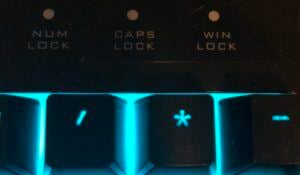
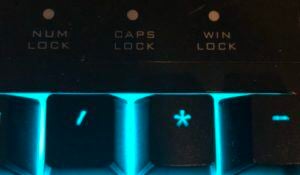
What’s interesting about most of these solutions is that some of them are pure nuclear.  I tried them anyway.  How could something so simple require so much?  Then, I noticed this button on my keyboard, **WINLOCK**

![Win Lock Key on Keyboard](https://propersky.com/hs-fs/hubfs/Imported_Blog_Media/img_9435-e1519529501950-300x175.jpg?width=450&height=263&name=img_9435-e1519529501950-300x175.jpg)

As embarrassing as this sounds, I have never seen or hit this key in the 30 plus years of dealing with computers.  My hunch was right, it disables the windows key but how to turn it back on befuddled me.

I did find this post in my internet travels, which basically says [**“To turn Win-Lock On or Off, press the Windows Key and Space Bar”**](https://docs.microsoft.com/en-us/archive/blogs/kvosters/quick-fix-windows-8-keyboard-stopped-working)  In my case, that was incorrect.  I needed to press:

**Fn + Win Key**

Magic commence.  Win + L.

**Need help managing your IT? Learn more about our [IT Solutions](https://propersky.com/services) here.**

![](https://propersky.com/hs-fs/hubfs/raw_assets/public/pike-child-proper-sky-2024/images/footer-bg.jpg?width=1800&height=1200&name=footer-bg.jpg)

## No BS. Just Proper IT.

Ditch mediocrity and gain more. More time, more results, and more confidence to focus on what matters most.

From Philadelphia with love

```json
{
  "@context" : "https://schema.org",
  "@type" : "BlogPosting",
  "author" : {
    "@type" : "Person",
    "name" : "Jim Smith",
    "url" : "https://propersky.com/insights/author/jim-smith"
  },
  "dateModified" : "2025-06-20T16:57:54.211Z",
  "datePublished" : "2018-02-25T05:00:00.000Z",
  "headline" : "How to Turn Off the Win Lock Key",
  "image" : [ "https://propersky.com/hubfs/Imported_Blog_Media/img_9435-e1519529501950-300x175.jpg" ],
  "mainEntityOfPage" : {
    "@id" : "https://propersky.com/insights/how-to-turn-off-the-win-lock-key-off",
    "@type" : "WebPage"
  },
  "publisher" : {
    "@type" : "Organization",
    "logo" : {
      "@type" : "ImageObject",
      "url" : "https://propersky.com/hubfs/brand/logo.png"
    }
  }
}
```

```json
{
  "@context" : "https://schema.org",
  "@type" : "Organization",
  "aggregateRating" : {
    "@type" : "AggregateRating",
    "ratingValue" : "5.0",
    "reviewCount" : "42"
  },
  "department" : {
    "@type" : "LocalBusiness",
    "address" : {
      "@type" : "PostalAddress",
      "addressCountry" : "US",
      "addressLocality" : "Abington",
      "addressRegion" : "PA",
      "postalCode" : "19001",
      "streetAddress" : "1916 Old York Rd"
    },
    "areaServed" : [ {
      "@type" : "Place",
      "name" : "Montgomery County"
    }, {
      "@type" : "Place",
      "name" : "Bucks County"
    }, {
      "@type" : "Place",
      "name" : "Philadelphia Metro Area"
    }, {
      "@type" : "Place",
      "name" : "Delaware County"
    } ],
    "description" : "Local IT support office serving businesses in Abington and surrounding counties with 24/7 monitoring, cybersecurity, and expert IT consulting.",
    "image" : "https://propersky.com/hs-fs/hubfs/brand/logo.png",
    "name" : "Proper Sky - Abington Office",
    "openingHours" : "Mo-Fr 08:00-17:00",
    "priceRange" : "$$",
    "telephone" : "+1-215-305-8899"
  },
  "description" : "Proper Sky provides expert-managed IT services, cybersecurity solutions, and strategic technology consulting for businesses across Pennsylvania.",
  "logo" : "https://propersky.com/wp-content/uploads/logo.png",
  "name" : "Proper Sky",
  "sameAs" : [ "https://www.linkedin.com/company/694458/", "https://facebook.com/propersky" ],
  "url" : "https://propersky.com"
}
```